Receivables
What your clients owe, how late it is, what the dunning ladder is doing about it, and the credit notes, write-offs and refunds that change the balance.

What it is
Receivables is the ageing report and the invoice list behind it: what is owed, how old it is, days sales outstanding, and per invoice what has been paid, credited, written off and chased. It is the other half of the month from Invoicing — that page is what you sent, this is what came back.
How to get there
Money → Receivables, directly under Invoicing. The ADMIN role is needed to open the console.
Reading the whole screen — the ageing report, the invoice list and an invoice's detail — is one key, finance.creditnote.view. It is deliberately the same key as the ageing report: two views of one question, and splitting them would let somebody see the total without being allowed to see what makes it up.
The actions are separate keys, and the buttons are only drawn when you hold them:
finance.creditnote.manage— draft and void credit notes.finance.creditnote.issue— issue a drafted credit note, which is what actually reduces the balance.finance.writeoff.approve— write off an unpaid balance.finance.dunning.manage— mark disputed, clear a dispute, pause or resume chasing.finance.payments.manage— refund a payment. Sending money back out is the payments key, not a billing one.
No plan gate.
How to use it
Read the ageing report
- The four figures at the top are Outstanding in your reporting currency, Days sales outstanding, the balance Over 90 days, and the reporting date it was all computed As at.
- The table below is one row per client and currency. A client billed in two currencies has two genuinely separate balances, and merging them would invent a figure that appears on no document.
- Buckets are Current, 1–30, 31–60, 61–90 and 90+ days past due. An invoice with no due date counts as Current.
- The footer totals every client in the reporting currency.
Run it for a past date, or one client
- Use the date picker at the right of the summary strip to back-date the whole screen. The list underneath is aged against the same date, so a row cannot sit in 61–90 in the table and 31–60 in the list.
- The client picker narrows both halves. It accumulates every client you have seen on any reporting date, so back-dating never strands you with no way back.
Open an invoice
- Search by invoice number or client, or filter by age, then click a row.
- The document shows five figures: Invoiced, Paid, Credited, Written off and Outstanding. Outstanding is computed once on the server by the same function the ageing report uses — the screen never subtracts its own credit notes.
- Lines, the tax breakdown, the place of supply and both tax registration numbers are printed as they were frozen at issue. A reissued 2024 document shows 2024's rate. A missing buyer tax number is stated in words, because a blank would read as "no number needed".
Credit an invoice
- Press Credit note. It is offered only on an invoice Projectri issued — an invoice mirrored from an ERP is read-only here.
- Pick a reason (billed wrong, scope changed, goodwill, dispute, cancellation, other), enter the amount and an optional note.
- The ceiling is what is still creditable — total less credits and write-offs — not what is outstanding. A payment does not make an over-billed line un-over-billed.
- Draft credit note creates it in draft. A draft does not reduce the balance. Someone with
finance.creditnote.issuepresses Issue on it, and that is the moment the client owes less. - Void cancels a credit note that has not been applied.
Write off a balance
- Press Write off, available on any non-draft invoice with something outstanding.
- Choose a reason — bad debt, dispute settled, our error, goodwill, scope we never billed for, small balance — and an amount, defaulting to the whole outstanding balance.
- The dialog says what happens: a full write-off clears the balance, moves the invoice to written off and stops the chasing; a partial one leaves the remainder outstanding and chasing continues.
Handle a dispute and the chasing ladder
- Mark disputed asks what the query is and pauses the dunning ladder while it stands. Clear dispute resumes it.
- The Chasing panel on the right is a timeline, not a log: each rung shows who it goes to (billing contact, account owner, all contacts) or what it does internally (notify the account owner, flag the client, block new work), how many days before or after the due date it falls, its date, and whether it is Sent, Due, Scheduled or has no due date to hang off.
- When the ladder is not advancing, the engine's own reason is printed rather than the screen guessing one.
- Pause chasing / Resume chasing stops or restarts it for this invoice alone.
- History lists what was actually sent, skipped, paused or failed.
Refund a payment
- Open the invoice and find the payment in the Payments panel. Each row shows gross, the processor's fee and the net that reached the bank as three separate figures.
- Refund appears only when the server says there is a refundable balance and you hold
finance.payments.manage. - It defaults to the whole refundable amount and stays editable. The dialog says plainly that the processor keeps its fee whatever you send back.
- The toast says "requested", not "refunded" — the ledger row is written when the signed webhook arrives, which is the only honest thing to say for the next few seconds.
What it affects
- Client credit standing. A dunning ladder rung can flag a client or block new work for them. Flagged clients are named in a banner at the top of this screen with a count of how many are blocked.
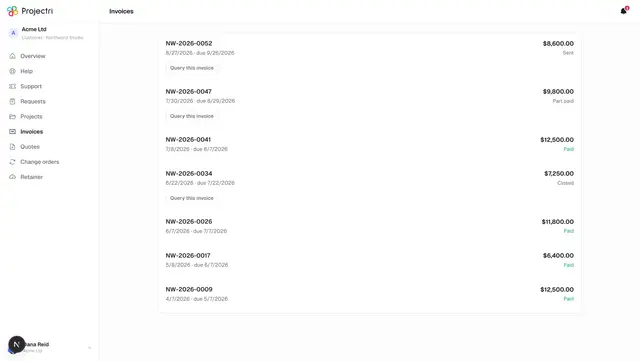
- The client portal. A credit note or a payment changes what the client sees on Invoices.
- Reports. Outstanding balances feed the receivables figures on Financials; write-offs and credits feed realisation.
- Notifications. The last rung of a ladder notifies the account owner with a link that opens the invoice on this screen directly.
- The audit log. Opening the ageing report is itself audited — it is the firm's cash position and its most awkward client relationships on one page, and "who pulled the AR report" is not a question you can answer afterwards unless somebody wrote it down.
On mobile
The Receivables screen in the phone app leads with the ageing strip and DSO — which is what somebody wants ten minutes before a board call — then the invoice list, worst first. Buckets are a horizontal strip rather than a five-column grid, because a table that wide is either unreadable or scrolled sideways. Tapping an invoice opens its detail. Every figure is computed on the server, so the handset and the browser cannot disagree about a client's balance.
Limits and gotchas
- A drafted credit note changes nothing. Drafting and issuing are separate permissions because preparing paperwork and reducing what a client owes are different decisions. Until it is issued, the balance is unchanged.
- Credit and refund are not the same document. Trying to credit more than is creditable is refused with exactly that sentence.
- Void and credit apply to different invoices. Void is only available on a draft invoice we issued; credit only on an issued one we issued. An ERP-sourced invoice supports neither — it mirrors a ledger we do not own.
- A back-dated report estimates paid amounts for ERP-synced invoices. Those rows carry no payment ledger, so the date the money arrived is not recorded. The affected invoice numbers are named rather than folded in silently.
- An unconverted currency is named, not hidden. If a balance is in a currency with no rate to your reporting currency, it is counted at 1:1 and the banner says which. Fix it on Finance setup.
- DSO can legitimately be blank. It is computed over a trailing 90 days; a firm that invoiced nothing in that window has no DSO, and printing 0 would read as "we collect instantly".
- No ladder means no chasing. A workspace that has configured no dunning policy gets none invented for it. The panel says so.
Related
- Invoicing — where these invoices came from.
- Finance setup — the dunning ladders, tax rules and payment connection this screen reads.
- Financials — WIP, margin and the exceptions list.
- Client invoices — the customer's own copy.