Quotes
What is out with clients and what they did with it — send a quote on a private link, watch it be opened, and turn the accepted one into a statement of work.
What it is
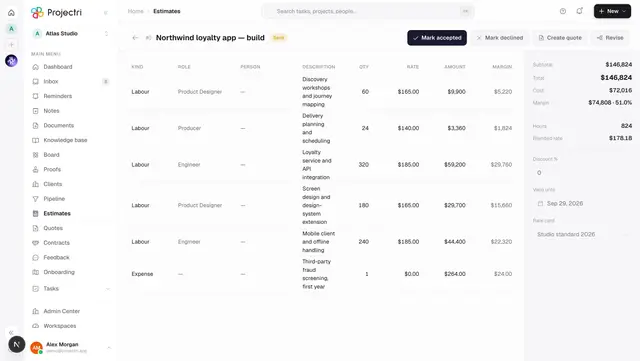
A quote is the document a client reads. It is made from an estimate, and making it freezes a snapshot of the lines as they stood — the estimate goes on being revised and re-priced, and the quote the client is holding does not move.
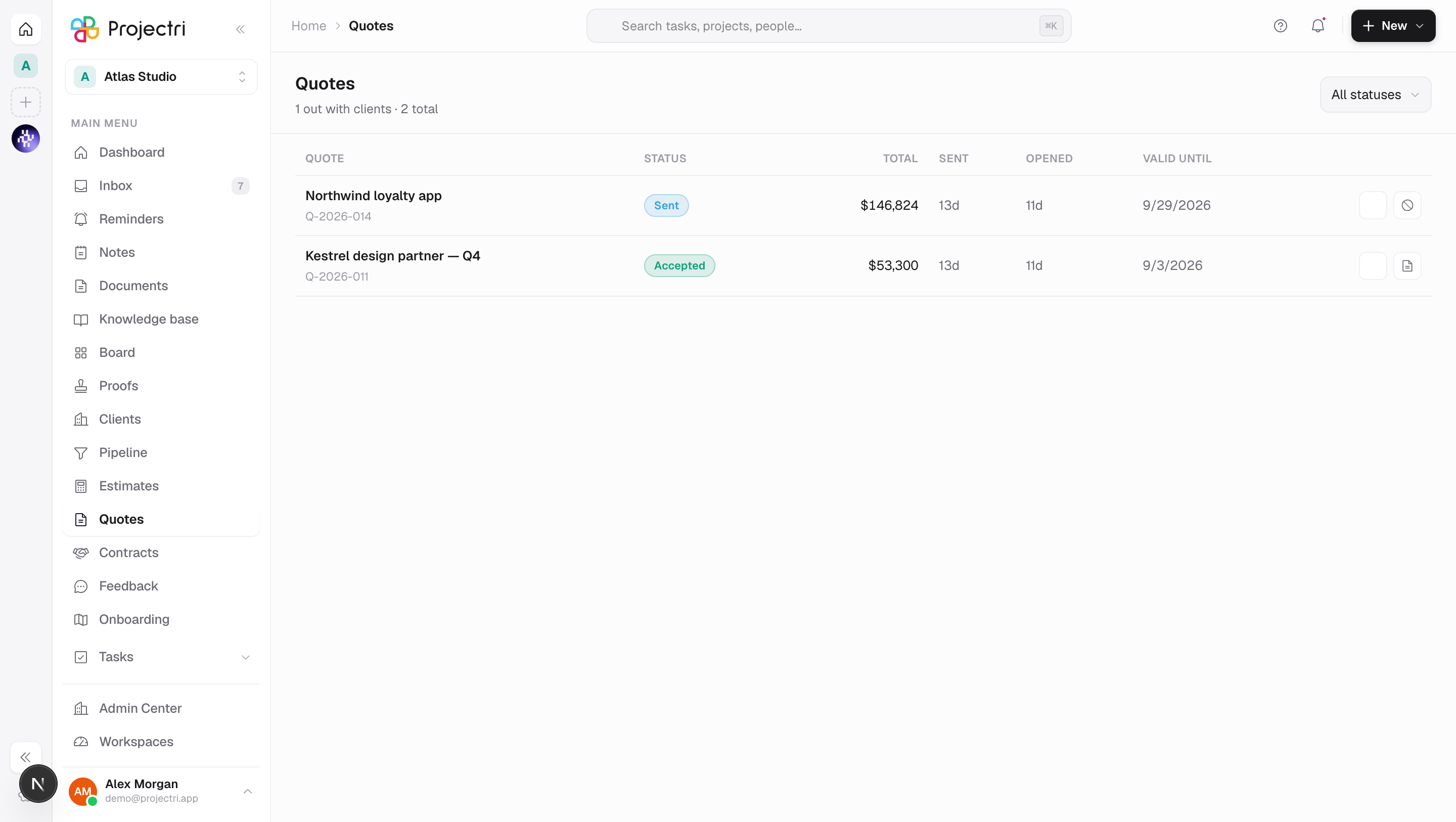
This list is built around the question sales actually asks, which is not the money: has the client opened it, and how long ago. So the total is one column, and the four to its right are all about the client's behaviour.
How to get there
Quotes is in the main navigation and needs quote.view. Like the other commercial keys it is excluded from the blanket viewer grant and is granted per role at Admin → Permissions.
Sending needs quote.send — the one that cannot be taken back. Withdrawing needs quote.withdraw. Drafting a statement of work from an accepted quote needs client.contract. Every write needs the commercial.quotes plan feature; reading the list does not.
There is no "new quote" button here, and the empty state says why: a quote is made from an estimate — open one and send it.
How to use it
Make a quote
- Open an estimate and press Create quote. It is offered on a draft or a sent estimate.
- The quote takes its title, currency, client and validity date from the estimate, and freezes the lines as a snapshot. You land here.
- Versions count per estimate, so re-quoting a revised estimate reads as "v2 of what we offered them".
Send it
- Press Send to the client on the row.
- Sending renders the PDF once, hashes those exact bytes, stores them, and mints an unguessable link at
/q/<token>. After that, none of the three can change. - Recipients get an email with the link, rendered in their own language rather than the sender's. The link lives until the quote's Valid until date, or 60 days when it names none.
- A quote that has already been sent cannot be sent again — a second render would produce a document that no longer matches the one the client holds a hash of. Send again with a fresh link is offered on an expired quote, and mints a new token so the lapsed link stays dead.
Hand the link over again
- Press Copy the client link. It copies rather than opens, on purpose: opening
/q/<token>from inside the workspace records a view and can flip the quote from Sent to Viewed, so you would be telling yourself the client had read it. - The button is ungated. The link has already been mailed to the client by whoever sent it, and re-handing it to them is not an edit.
Watch what the client does
- Sent is how long ago it went out. Opened is how long ago it was first opened and, when there is more than one, how many times — one open is a glance, five is a document being circulated internally.
- Viewed is a status you can filter on, not a timestamp in a tooltip. The difference between "no answer" and "opened four times and no answer" is the difference between resending the email and picking up the phone.
- Valid until marks the row lapsed once the date has passed. Nothing sweeps quotes to Expired, so a Sent quote past its date is still Sent — but the public page will refuse a signature on it.
Withdraw one
- Press Withdraw and confirm. It is offered on a Sent or Viewed quote only.
- The client's link stops working immediately — the token is cleared, not left to expire — and the quote cannot be sent again. The next step is a new version.
- The document, its hash and the view history all stay. A withdrawal is a thing that happened, not a thing that unhappens.
- An accepted or declined quote cannot be withdrawn. By then it is a decision with weight, and retracting it in our records alone would leave the two parties holding different accounts of the same deal.
Turn an accepted quote into a contract
- Press Draft the SOW from this quote and confirm.
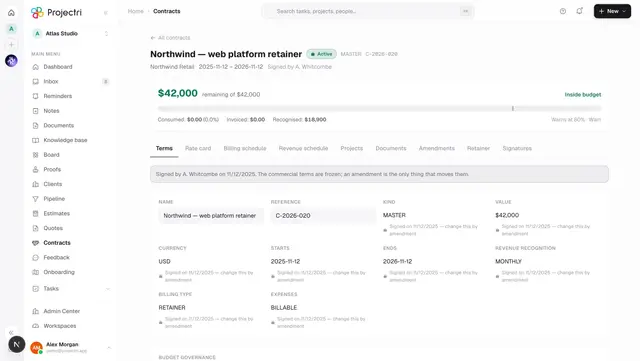
- It lands as a draft contract carrying the quote's value, currency, rate card, dates and the quote PDF. Nothing is sent to the client. A quote being accepted is the client saying yes; a contract existing is us saying we are ready to be held to it, and those are not the same moment.
- A quote can only be converted once. Afterwards the row offers **Open the contract this became** instead.
What the client sees on the public page
/q/<token>opens with no sign-in, no app chrome and no navigation. The reader may never have a Projectri account, and anything that looks like a product to log into invites them to hunt for a password instead of reading the quote.- It shows your workspace's name or logo, the quote number and version, the intro, the lines grouped into the sections you wrote them in, hours, subtotal, discount, total, terms and the validity date. It carries **no cost and no margin** — those fields are simply not in the snapshot, so the omission is not a permission check that could be got wrong later.
- Opening it records a view. The first open moves the quote from Sent to Viewed. Reading a decided quote again does not un-decide it.
How the client accepts or declines
- The client presses Accept this quote, then types their full name, email address and an optional job title.
- The page states what it is doing: typing your name records your acceptance, and your name, address, job title, the date and time and the exact document you are accepting are stored as the record. It also says plainly that this is a record of acceptance, not a legally certified electronic signature — a client whose organisation requires one is told to say so first. For a certified signature, send the document from the contract's Signatures tab instead.
- Declining asks for a reason from a fixed list — price, timing, scope, going with someone else, no decision for now, or something else — plus an optional note. A decline without a reason is a lost deal nobody learns from.
Where the signature is stored
- Accepting or declining writes a signature record against the quote holding the action, the signer's name, address and title, any decline reason and note, the client's network address and browser, the timestamp, and the SHA-256 of the exact PDF that was sent. That hash is what ties the signature to a document rather than to a total that has since moved.
- The record is returned by the quote API; the workspace also gets a notification to the quote's owner and an audit entry.
- Answering twice is harmless: the same decision is returned as already recorded rather than written again, and only a genuine first decision rings anybody's bell.
What it affects
- The estimate. Accepting or declining moves the underlying estimate to the same status. Leaving it behind would mean the pipeline still showed an open deal the client has already answered.
- Nothing is provisioned. A client accepting a quote creates no project, no task and no contract. The next step is somebody inside the workspace pressing Draft the SOW from this quote, or converting the estimate to a project.
- Notifications. The quote's owner is told, on both doors — the tokened link and the portal — and only they. A quote has exactly one person whose next move it is.
- The expiry reminder. A quote with a validity date gets one reminder three days before it lapses, mailed to whoever it was last sent to and written as a portal notification to the client's contacts. Re-sending re-arms it.
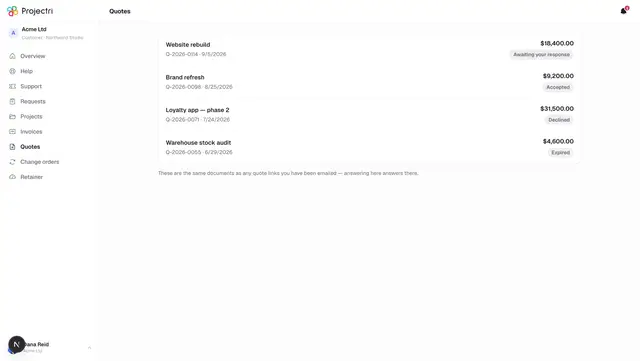
- The client portal. A client with a portal login sees the same quote at Portal → Quotes and can accept or decline it there. Both doors enforce the same rules.
On mobile
The Quotes screen in the Expo app is the same list and the same four actions, decided from the same table so a control never appears on one surface and not the other. The link action differs by surface honestly: the web copies the URL, the phone opens the share sheet, because on a phone that link is going straight into a message. Authoring a quote stays on the web — its wording is written beside the client's email, and sending freezes the PDF, its hash and its link together.
Limits and gotchas
- Do not open
/q/<token>yourself to check it. It records a view and can move the status to Viewed. - A dead link is answered with a flat "not found" for wrong, expired and withdrawn alike. Saying "expired" would confirm the token was real.
- Expiry is evaluated when the link is opened, not by a nightly job. A quote that lapsed at midnight is lapsed whether or not anything ran.
- "Valid until the 30th" means the whole of the 30th. Acceptance is refused from the 31st.
- Accepted and declined are terminal. A client who changes their mind gets a new version, not a rewritten one.
- If the workspace has no blob storage configured the PDF bytes may not be stored, but the hash always is. Losing the bytes is recoverable; losing the tie between a signature and a document is not.
- Every money field on the wire is in minor units, including the snapshot the client's page renders from.
Related
- The estimate builder — where a quote is made.
- One contract — what an accepted quote becomes, and where certified e-signature lives.
- Portal → Quotes — the same document for a client with a login.
- Notifications — what an acceptance rings, and for whom.