Approvals
Your personal sign-off queue — the workflow steps waiting on you, and the agent actions paused until somebody who holds the permission says yes.
What it is
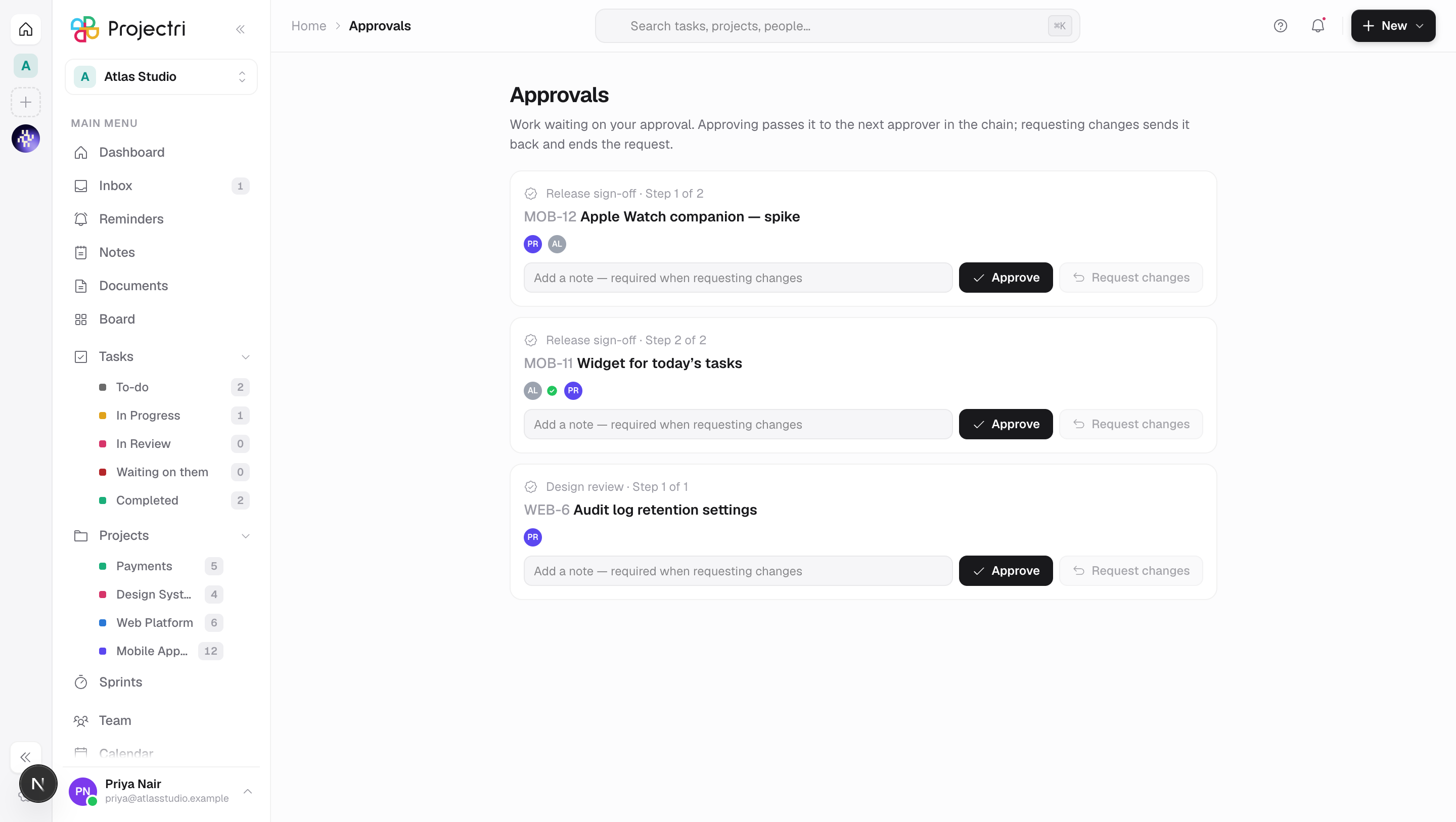
Approvals is what is waiting on you. Two kinds of thing land here: a step in an approval workflow that has reached your name, and an action an agent has paused on because it wants to do something sensitive.
For most people it is empty most of the time, which is the point. It is also the page every approval notification links to, on the web and on the phone.
How to get there
Approvals in the main navigation. The row is gated on task.view and nothing stronger — being named in an approval chain is not a role, so any member can hold one. There is no plan gate, and no entitlement: a downgrade must never make the queue look empty while three people are waiting on an answer.
Deciding a workflow step needs no permission key at all. A chain names people, and the whole of the authorisation is being the step it is currently waiting on. That is deliberate — a role change should not be able to strand a request addressed to somebody by name with no way out of it.
Deciding an agent's request is different: it needs the same permission key the action itself needs, resolved at the moment you press the button. Holding agent.manage is not enough and never has been, because approving an action you could not perform yourself is a way to acquire a permission by proxy.
How to use it
Read the queue
- Agent requests, when there are any, sit at the top under **Waiting on you from an agent**. That section hides itself entirely when it is quiet.
- Workflow chains follow, one card each. The line above the task names the workflow and says Step n of m.
- The row of avatars is the chain in order. The current step is marked; a green tick is a step already approved and a red cross is the step that refused it.
- Click the task title to open that task.
Decide a workflow step
- Type a note in the box on the card. It is optional for an approval and required to request changes — the button stays disabled until you have written one, rather than turning your click into an error.
- Approve passes the request to the next approver in the chain. They are notified; you are not asked again.
- Request changes ends the request there and then. Every step behind you is cancelled, so a dead chain does not sit in three people's queues.
- The card leaves the list as soon as the server accepts the decision.
- A note is kept at 500 characters.
Decide an agent's request
- Each card names the agent, what it wants to do, the Tool it would use and the permission it Needs, with the time it was asked.
- A clock on the card counts down. A request stands for 24 hours and then expires — an expiry is a decision nobody made, so the oldest are shown first.
- The reason box is optional on both buttons and is recorded either way.
- Approve does not carry the action out. It puts the paused run back in the queue, and the executor resumes it on its next tick; the confirmation says so rather than claiming the work has happened.
- Reject ends the run's attempt. The agent's owner is told.
- If two people open the same request, exactly one of them decides it. The other is told what the answer already was rather than shown an error.
When there is nothing you can act on
- A chain where you are third and the first approver has not looked yet is not in your queue. Only the step a chain is currently waiting on is yours, because a queue that lists work you cannot do is a queue people stop opening.
- Agent requests you do not hold the permission for are **counted, not hidden**: a line says how many more need a permission you do not hold. An empty queue and a queue full of other people's questions are different situations.
What it affects
- Approving a workflow step notifies the next approver and hands them the request. Nothing else in the product moves; the chain is a record of sign-off on the task, and it is drawn in the task panel's own approvals section.
- Requesting changes cancels the rest of the chain. Everyone who was in that round — the people who already decided, and whoever else was still named — is told, with your reason.
- Approving an agent's request releases a real action. The run resumes holding everything it had reasoned before it paused, and carries out the exact arguments that were proposed, not a fresh guess at them. The permission is checked again at execution, so authority that has changed in the meantime still bites.
- Rejecting or letting one expire changes nothing, which is why both are notified: a refusal leaves no trace on any screen, and an expiry leaves none at all.
- A decision is written to the audit log —
approval.approvedorapproval.rejectedagainst the task, with the workflow named. - The notifications that land here reach the phone. The same row that raises the bell raises the push, because the value of an approval is a fast decision and one that waits for somebody to open a laptop is not one.
On mobile
The Expo app has the same screen at Approvals, and it is arguably the more important surface: an approver is by construction not the person doing the work, and a sign-off queue that can only be cleared at a desk stays full while people wait. It carries the same two sections, the same Approve and Request changes actions, the same required reason for a refusal, and the same withheld count.
Limits and gotchas
- A request can only be raised from the task, in the Approvals section of the task detail panel, by picking a workflow. A chain scoped to a project can only be raised on that project's work, and a second live request from the same chain on the same task is refused.
- An agent request expires after 24 hours whether or not anyone saw it. Expiry is about freshness, not tidiness — an agent's proposal describes the workspace as it was when it read it, and approving it a week later would act on a reading that is no longer true.
- Who gets told about an agent request is not symmetrical. The agent's owner is always notified. Everybody else who holds the deciding permission is notified only when the key is on the approval floor — money, client-visible, structural, or a delete, bulk edit or import. For anything a workspace has added to its own list voluntarily, the owner is the only recipient, and a request can sit unseen until the clock answers it.
- The fan-out is capped at 25 people. The owner is always first in the list, so the cap can never drop the one person accountable for the agent.
- Stopping an agent voids what its paused run was waiting on. The card leaves the queue rather than staying as a live button that would restart a stopped agent.
- The agent section is the same component the admin console mounts at **Admin → Agents → Approvals**. That console page redirects anyone who is not an administrator, which is exactly why the queue also lives here — the approver the permission rule was written for is usually not an admin.
Related
- Inbox — the notifications that link here.
- Approval workflows — where a chain and its ordered approvers are defined.
- Agent approvals — the same agent queue on the admin console.
- How approvals work — rounds, chains and what a decision means.
- Notifications — who is told, and where the link goes.