
Approvals
The two things in Projectri that wait for a person to say yes — an approval chain on a task, and an AI agent asking permission before it changes anything.
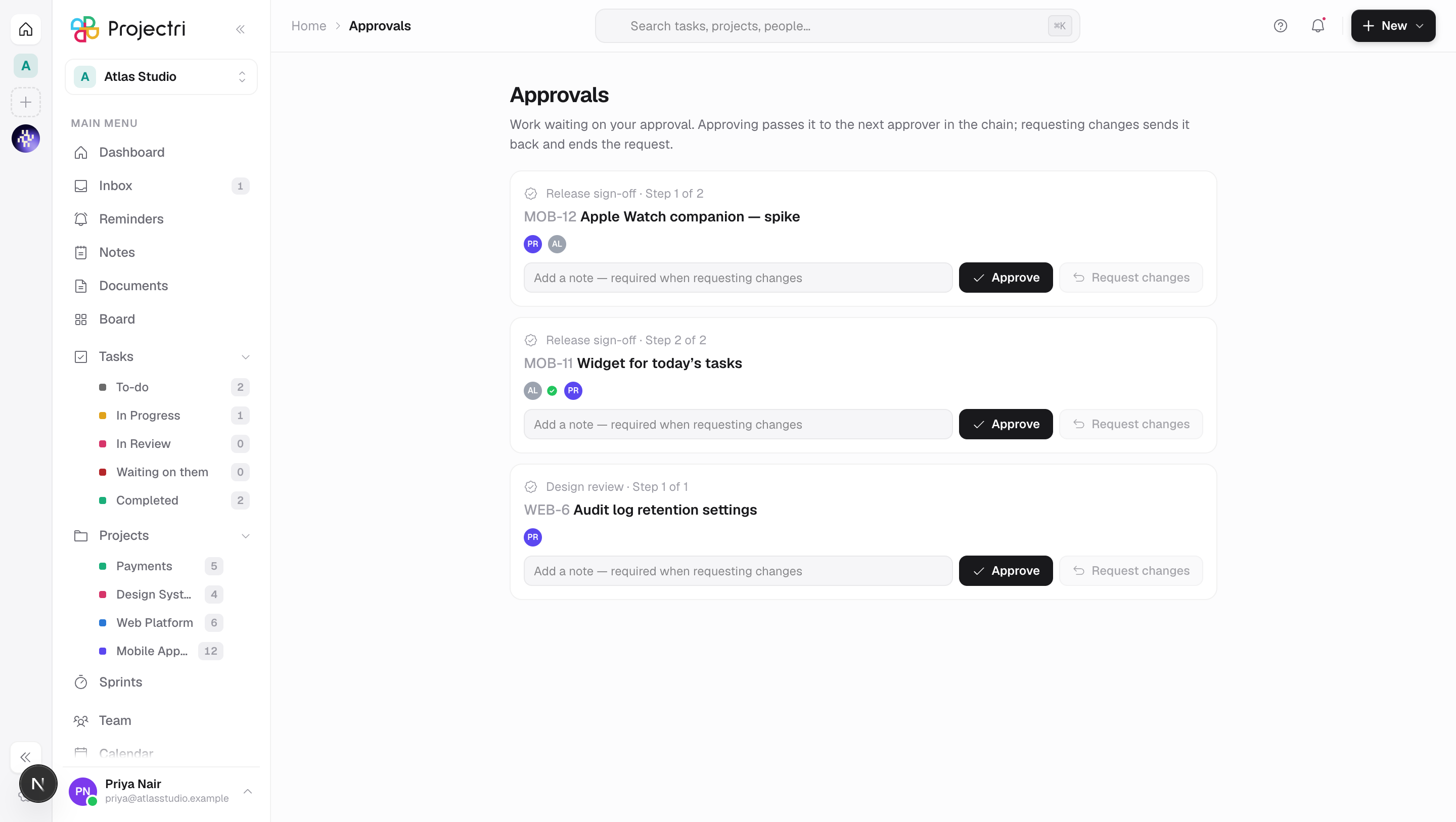
What it is
Two different things share the word, and it is worth keeping them apart.
An approval chain is an ordered list of people who must sign off on a task before it counts as done. An admin configures the chain; anybody raises a request against it.
An agent approval is an autonomous agent stopping mid-thought because the next thing it wants to do changes data. It is a paused conversation, not a queued job, and what you approve is a specific action with specific arguments.
How to get there
Approval chains are configured at Admin → Workflow. A request is raised and answered on the task itself, and reading or raising one needs task.view.
Agent approvals appear in two places: your own approvals queue in the workspace, and Admin → Agents → Approvals for administrators. The personal queue needs only workspace membership — it is filtered to requests you could carry out yourself, so nothing is disclosed by the looser door.
How to use it
Raise an approval on a task
- Open the task, choose the approval workflow.
- Only the first approver is asked. The chain is ordered because the second person's judgement is meant to be informed by the first's; asking everybody at once is a different feature.
- Each approver in turn is notified when it reaches them.
Answer one
- Open the notification, or the task.
- Approve or reject, with an optional comment.
- A rejection ends the request there and then. The remaining steps are cancelled rather than left pending, so nobody is waiting on a chain that is already over.
- The authorisation to answer is being the step it is waiting on, by name — not a permission key. A role change cannot strand a request addressed to somebody personally.
Raise the same chain again
A chain refused last week and raised again today is a second round. Both are kept, and only the open one can be answered.
Answer an agent
- The request names the tool, the arguments, and a one-line preview written by the tool — "Comment on ENG-241 — Sprint scope" — with the run's transcript above it, which is the reason the agent gives for wanting to.
- Approve and the run resumes and carries out exactly that action. Reject and the run ends; rejecting is a distinct ending from cancelling the agent, so an operator scanning a list can tell them apart.
- You may only approve what you could have done yourself. The check is against the same permission key the action needs, resolved live at the moment you press the button. Being a workspace administrator is not enough — that would be a way to acquire a permission by proxy.
What it affects
- An agent approval expires in 24 hours and expiry behaves exactly like a rejection. Nothing is carried out, and the run ends.
- The permission is re-checked at execution, not only at the request. The intent has not changed but the authority may have: an owner demoted between the question and the answer does not get their agent to act.
- Approving does not re-ask the model. The action was captured when it was proposed, so the sentence you read and the thing that happens are the same thing rather than two invocations of a non-deterministic system.
- One paused run holds one question. A second pending request for the same run is impossible by construction.
- An approval request rings the bell and reaches the phone, because the whole value of an approval is a fast decision and one that waits for somebody to open a laptop is not one.
Who is told about an agent's request
The agent's owner, always — they are the accountable person. And, for the keys on the safety floor only, everybody who holds the deciding permission.
That asymmetry is deliberate. A floor key is narrowly held by definition, and a request nobody sees is a request the clock answers. A key your workspace added to its own review list — say, commenting on a task — is held by most of the workspace, and fanning that out would page most of the workspace.
The fan-out is capped at 25 recipients, with the owner always first.
The safety floor
Some things always pause for a person, whatever an agent is configured to do, and the switch that would appear to turn that off does not exist:
- Money — anything under finance, billing, bills, purchase orders, contracts, quotes, estimates, change orders or vendors.
- Client-visible — clients, the portal, proofs, surveys, support. A client reading something a machine wrote, believing a person wrote it, is a trust failure no audit trail undoes.
- Structural — privacy, security, roles, agents and imports.
- Bulk or destructive — anything ending in delete, bulk edit or import.
On mobile
The Approvals screen in the phone app is the same personal queue, filtered the same way, and the push notification is what makes it useful — an approval answered from a pocket is the difference between a run that finishes today and one the clock refuses tomorrow. Administrators also have the agents approvals screen under Admin.
Limits and gotchas
- An approval chain copies the approvers at the moment it is raised. Adding a fourth approver next month does not rewrite the history of approvals already given — which is also why the console refuses to reorder a chain that has been used.
- A chain with no approvers cannot be raised, and a workflow scoped to one project cannot be raised on a task outside it.
- You cannot raise the same chain twice on one task while it is open.
- An agent's request is about the workspace as it was. That is why it expires: "move these twelve overdue tasks to Blocked", answered a week later, acts on a reading that is no longer true and the person pressing the button has no way to see it.
- Agent writing is behind a feature flag — the gate itself is not. A safety mechanism behind a switch is one somebody can turn off, and the failure mode of turning this one off is an agent writing unsupervised.
Related
- Workflow — building an approval chain.
- Agent approvals — the administrator's view of the queue.
- Agents — what an agent is and what it may hold.
- How permissions work — the keys an approver is checked against.


