Skills
The skills taxonomy for this workspace — where coverage is thin, the curated list itself, proposals waiting, a people search, and the certification catalogue.

What it is
What people here can do, who has confirmed it, and where the gaps are. A skills taxonomy is not a scheduling artefact — it outlives every booking made from it, and half of what it records is certifications with hard expiry dates, which is a compliance obligation rather than a question about who is free in October.
How to get there
People → Skills in the admin console rail, at /<workspace>/admin/skills.
Two keys sit behind one page, and the tabs a reader cannot open are absent rather than disabled:
skill.viewopens the page, the Skills list and Find people. It rides the blanket VIEWER grant on purpose — the directory is a phone book.skill.manageadds Coverage and Proposals, and the ability to curate the list. A gap analysis is a statement about where the business is exposed, which is not a phone book.skill.validateis what confirms somebody else's rating or verifies their certificate. A taxonomy admin curates the list; a lead vouches for a person, and those are different people on purpose.
Writing to the taxonomy needs the resourcing.skills plan entitlement.
How to use it
Read coverage
- The Coverage tab is the landing tab, sorted thinnest first, because nobody opens a taxonomy console to admire a list.
- The columns are Projects demanding the skill, Capable (level 3 and above), Advanced (level 4 and above), Confirmed ratings, Stale ratings, and Headroom — capable minus demand, so a negative number is short.
- A skill exactly one person covers is called out separately, in amber. It scores zero headroom against one project and would otherwise sort into the safe middle, while being one resignation from short.
Curate the list
- On the Skills tab, filter by name or by any recorded spelling.
- Add skill creates one, optionally in a category.
- Merge folds one skill into another. The dialog names which one survives as a sentence before it will commit — the other becomes a spelling of it, everybody rated on either keeps the stronger of their two ratings, and any confirmation is kept.
- Open a skill to manage its other spellings, so somebody searching "ReactJS" still lands on "React".
- Archive takes a skill out of circulation. Existing ratings are kept.
Clear the proposal queue
- Anybody who can rate their own skills can propose one that is missing. They land on the Proposals tab, and the count is on the tab itself so a queue nobody knows has filled up does not quietly kill the propose path.
- Link attaches the proposal to an existing skill as another spelling. The queue offers the closest match first and this is the default action, because most proposals are a spelling of something already on the list.
- Add as new is the deliberate second choice. Approving everything is how a curated taxonomy turns back into free text, one row at a time.
- Reject discards it.
Find people
- The Find people tab takes a list of skills, each with an optional minimum level.
- People who have all the skills asked for rank above stronger specialists who have some.
- Only confirmed ratings is the harder filter, for when a self-rating is not enough. Without it, a confirmation improves someone's score rather than deciding their eligibility.
- Terms that match nothing in the taxonomy are named and left out of the search rather than silently ignored.
Run the certification catalogue
- The Certifications tab holds the certifications this business sells or has to hold. Each has an issuer and either a validity in months or no expiry at all.
- Expiring shows what lapses inside a window, with what has already expired counted separately.
- Pick a person to see what they hold, record a new certificate against them — with its reference number, so an auditor can check it with the issuing body — or verify one they submitted.
- Deleting a certification that people hold removes the record of every holder with it, and the confirmation says how many. That evidence cannot be recovered.
What it affects
- Resourcing search and ranking read the same numbers this page shows.
Counts ason a rating — the effective level — is what search sorts on, which is why the screens show it rather than only the raw rating. - A rating decays with disuse. A skill not used for more than two years drops a level; past four years it drops two. It never falls below 1 — decay discounts, it does not erase. Those are the ratings the coverage tab counts as stale.
- Project skill requirements are what the coverage tab counts as demand.
- Certification expiry notifies on a ladder — 90, 60, 30 days and expired — and each rung fires once, so a nightly sweep does not produce the same warning for sixty consecutive mornings.
- A merge rewrites nothing about people. Ratings are carried across, keeping the stronger of the two, and the losing name survives as a spelling.
On mobile
Admin → Skills answers the two questions that get asked in a room rather than at a desk: where the business is thin, and who could cover a piece of work. The coverage read is gated on skill.manage there too, and a refusal is told apart from a failure. The phone does not validate a rating — that is a judgement made with somebody's history in front of you, and offering it on a phone would be offering a decision with none of the evidence.
Your own skills and certificates are on your profile, on both surfaces.
Limits and gotchas
- Levels run 1 to 5 — Aware, Assisted, Independent, Leads, Sets direction — and the labels can be reworded per workspace.
- A rating carried in from an older migration is shown as "migrated, unrated" rather than as a real 3. The migration invented that number, and saying so is the difference between a useful default and a lie.
- You cannot verify your own certification.
- Certificate dates are calendar days, not timestamps. A certificate that expires on the 1st does not read as the 31st west of UTC.
- A merge is not symmetric and cannot be undone from this screen.
Related
- Members — the people these ratings belong to.
- Teams — how those people are grouped.
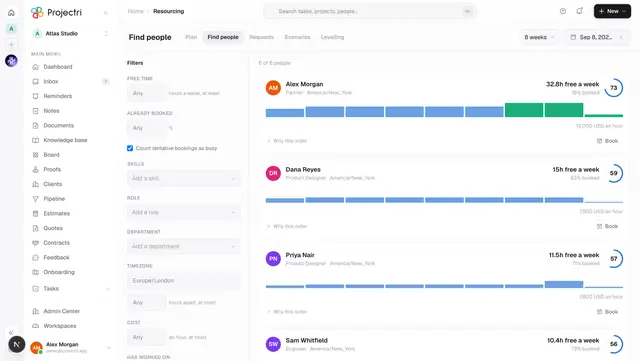
- Find people — the same search inside resourcing.
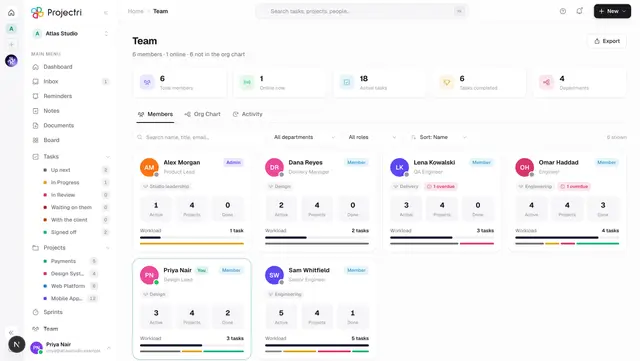
- Team — the directory a rating shows up on.