Portfolio
Every project on one timeline, in swimlanes by client or department, with milestones, active sprints and what is running late.
What it is
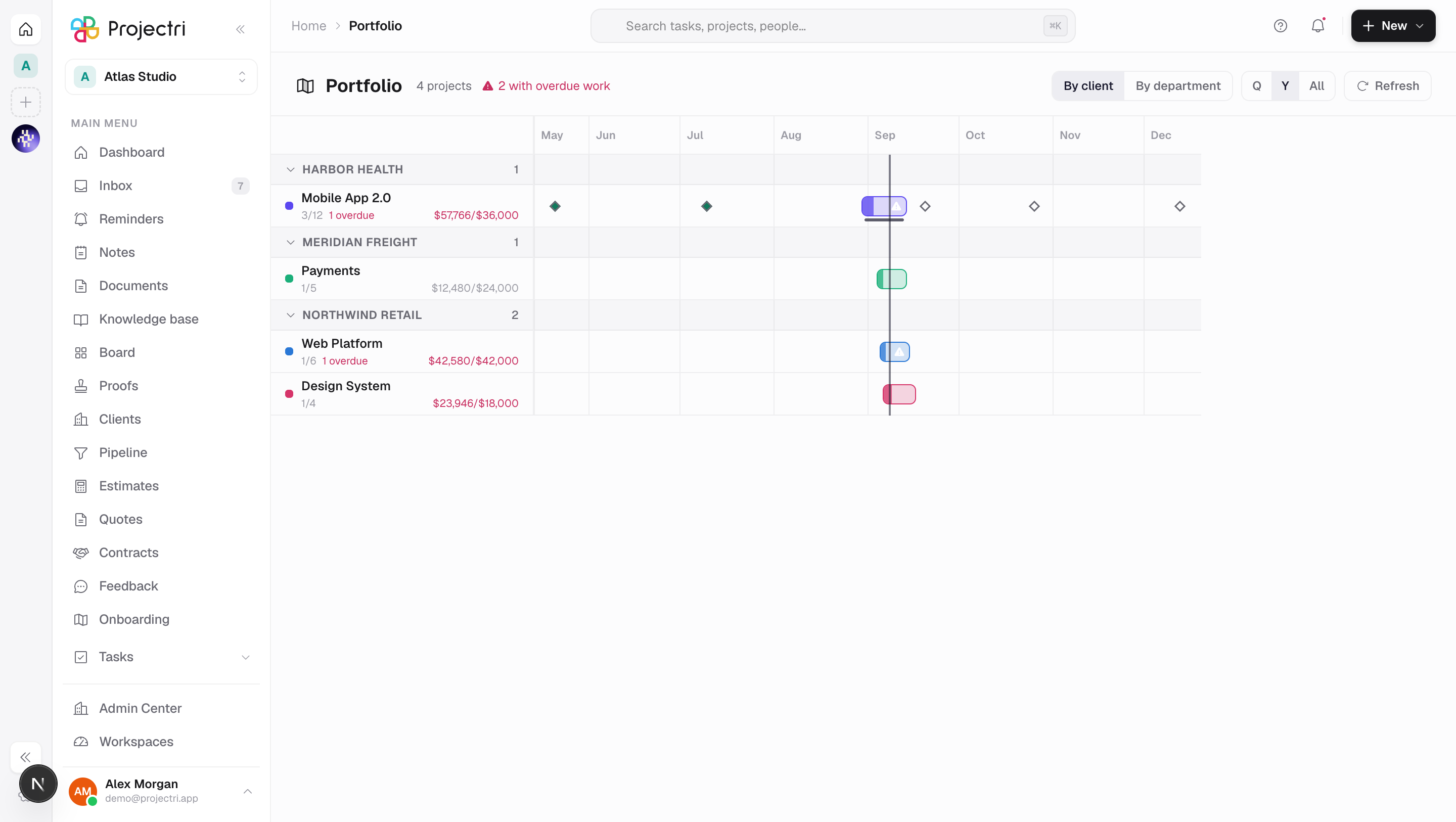
Portfolio is a roadmap across every project at once. Each project is a bar positioned by the work inside it, grouped into swimlanes, with milestones as diamonds and the current sprint as a thin rail underneath. It answers the question no single project page can — what is running at the same time, and which of it is late.
How to get there
Portfolio is in the main navigation, gated on report.view.
Budgets appear only for a reader who holds report.financial. Where that key is missing the fields never leave the server, so an absent budget on a row means either "not permitted" or "never set" and both read the same way — as nothing.
There is no plan gate on this screen.
How to use it
Read the roadmap
- Rows are sorted by start date, undated projects last. A roadmap reads left to right and a project with no dates has no position on one.
- The roadmap opens at today rather than at the left edge — today sits about a third of the way in, so the recent past stays visible. The vertical accent line is today.
- A bar's fill is how far through the project is, by completed tasks. The percentage is written inside the bar where there is room.
- A warning triangle on a bar means the project has overdue work. Late means work is overdue, not that a planned end date has passed — a project can be past its end with everything finished.
- Diamonds are milestones. Filled red is overdue, green is completed, hollow is still ahead. A milestone can sit outside the project's bar; a target date with no work against it yet is exactly the thing worth seeing on a roadmap.
- The thin accent rail under a bar is the project's active sprint.
Change the shape
- By client / By department switches the swimlanes.
- Q / Y / All zoom the axis. Three steps rather than a slider, because the useful questions are this quarter, this year and everything.
- Click a swimlane header to collapse it.
- Refresh re-reads the whole roadmap.
Open a project
Click any row, in the gutter or on the timeline, to go to that project.
What it affects
- Nothing. Portfolio is read-only. It is deliberately not a Gantt — there are no dependencies between projects in the model, so arrows would be decoration, and the interaction here is "click through to the project", not "drag the bar".
- A project's span is derived, not stored. There is no start date on a project. The bar runs from the earliest start or due date of the work inside it to the latest due date, so adding or re-dating a task moves the bar.
- A project's department is its people's. A project has no department of its own, so grouping by department uses the lead's department, and failing that the one most of its members report into. Ties break on the name so lanes are stable between loads.
On mobile
The Expo app has Portfolio as a list rather than a chart — one card per project, ordered by start, with the span written out instead of drawn. A timeline wide enough to be readable does not fit a phone, and a squeezed one turns every project into the same short smudge. The questions that survive the change of shape are the ones a phone is used for: what is running, what is late, what is next.
Limits and gotchas
- A project whose tasks carry no dates at all cannot be drawn. It still gets a row and the words no dates, and the count of them is stated in a footer — a roadmap that quietly omits a third of the portfolio is worse than one that admits it.
- If every project is undated the page says nothing is scheduled yet rather than drawing an empty chart with rows down the side.
- Archived projects are excluded, and at most 200 projects are read.
- Projects with no client or no department are gathered into a named bucket rather than dropped, because a portfolio where half the work sits outside any client is itself worth seeing.
- Budgets are shown in the currency frozen on the project when the budget was set; the workspace's reporting currency only stands in where the budget never named one.