Documents
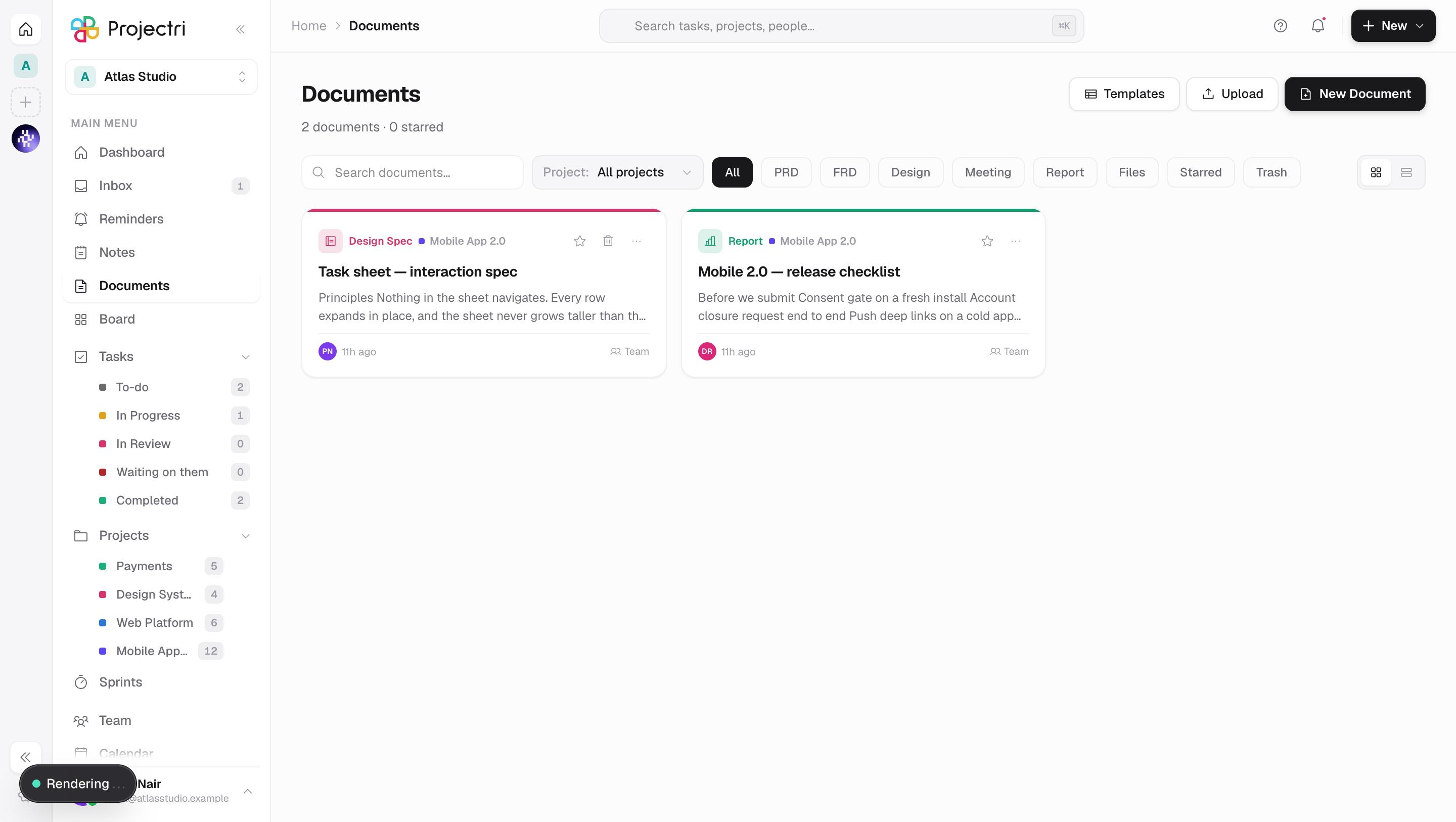
Written documents and uploaded files in one library, with type filters, drag-and-drop upload, templates and a trash tab.
What it is
Documents holds two kinds of row in one list: documents somebody wrote in Projectri, and files somebody uploaded. They share a table and an editor with Notes — the module is what differs — so an uploaded PDF and a written product spec sit side by side, are filed under the same projects, and are shared the same way.
How to get there
Documents is in the main navigation. The list needs document.view. Templates, Upload and New Document only appear if you hold document.upload, which is also the key for editing. Deleting needs document.delete. There is no plan gate — documents are part of the core tier on every plan.
How to use it
Find something
- The search box matches on title, preview text, the uploaded file's name, project names and tags, over the rows already loaded.
- The chips filter by type: All, PRD, FRD, Design, Meeting, Report, Files, Starred, Trash.
- Project narrows to one project, and the pill below tells you *"New documents and uploads will be filed under …"* so an upload is not filed somewhere you did not intend.
- Ordering is fixed: starred first, then most recently edited. There is no sort control.
Upload files
- Press Upload, or drag files anywhere onto the page — an overlay reads "Drop files to upload — Each becomes a document · up to 25 MB".
- Up to 10 files at a time, each at most 25 MB.
- Accepted types are images (JPEG, PNG, WebP, GIF, AVIF), PDF, plain text, CSV, Markdown, Word, Excel, PowerPoint, RTF, ZIP and JSON. Executables, scripts and SVG are refused on purpose.
- One file opens straight into its document; several take you back to the list.
Each uploaded file becomes its own document, typed File, titled from the filename without its extension.
Write one
- Press New Document for a blank one, or Templates to start from Product Requirements, Functional Requirements, **Design Specification, Meeting Notes, Report or Blank Document**.
- The document opens in the editor. See A document.
Act on a row
Right-click a card, or use …: Open, Rename…, Star / Remove star, Duplicate, Share…, Copy link, Download file (on uploads), Move to trash. In the trash tab: Restore and Delete permanently.
Permanently deleting an uploaded document also deletes its stored file.
What it affects
- Storage. The uploaded file, every attachment, every embedded image and every stored version all count against the workspace's storage meter — the one billing reports. An upload that would take the workspace over its ceiling is refused before anything is stored, with a message naming the figures: *"This workspace has used 4.9 GB of its 5.0 GB of storage"*.
- Search indexes what was written, not what was uploaded. A document's searchable text is its title, its tags and the body somebody typed. An uploaded PDF or Word file has no body, so it is findable by name and tag only. Its contents are not read.
- Nia cannot read an uploaded file from the library. The Ask Nia button is hidden on a document that is a file.
- Filing under a project puts the document on that project's documents tab. Several projects are allowed; the first is the primary.
- Duplicating copies the content, type, tags, status, visibility and project filing, and — for an upload — points at the same stored file. It does not copy shares, the public link, comments, versions, attachments or the star.
On mobile
The phone has a Documents list. It is read-only: documents are written and uploaded on the web app only. Search matches the title and the file name. Tapping a row opens the same reader a note uses, which shows the file the way the web app shows it rather than handing it to the phone's browser.
Limits and gotchas
- There is no document approval workflow. The
document.approvepermission exists in the catalogue but nothing in the product enforces or offers it. E-signature is a separate feature and usesdocument.share. - *Sharing and commenting on a document check the note permissions.* The document share and comment endpoints are the note ones, so sharing a document needs
note.shareand commenting needsnote.update.document.commentis not enforced anywhere on this module. - No text is extracted from an uploaded file. There is no OCR.
- Video is not an accepted upload type.
- The list search only reads loaded rows. Global search is the one that reads bodies.
- Nothing purges the trash on a schedule.
Related
- A document — the reader, versions, attachments and sharing.
- Notes — the same rows, for written notes.
- Projects — where a filed document also shows up.
- Data and privacy — what is stored and for how long.