Invoices
Your invoices with what is still outstanding, any credit notes applied, payments received, a pay button where card payment is available, and a way to query one.
What it is
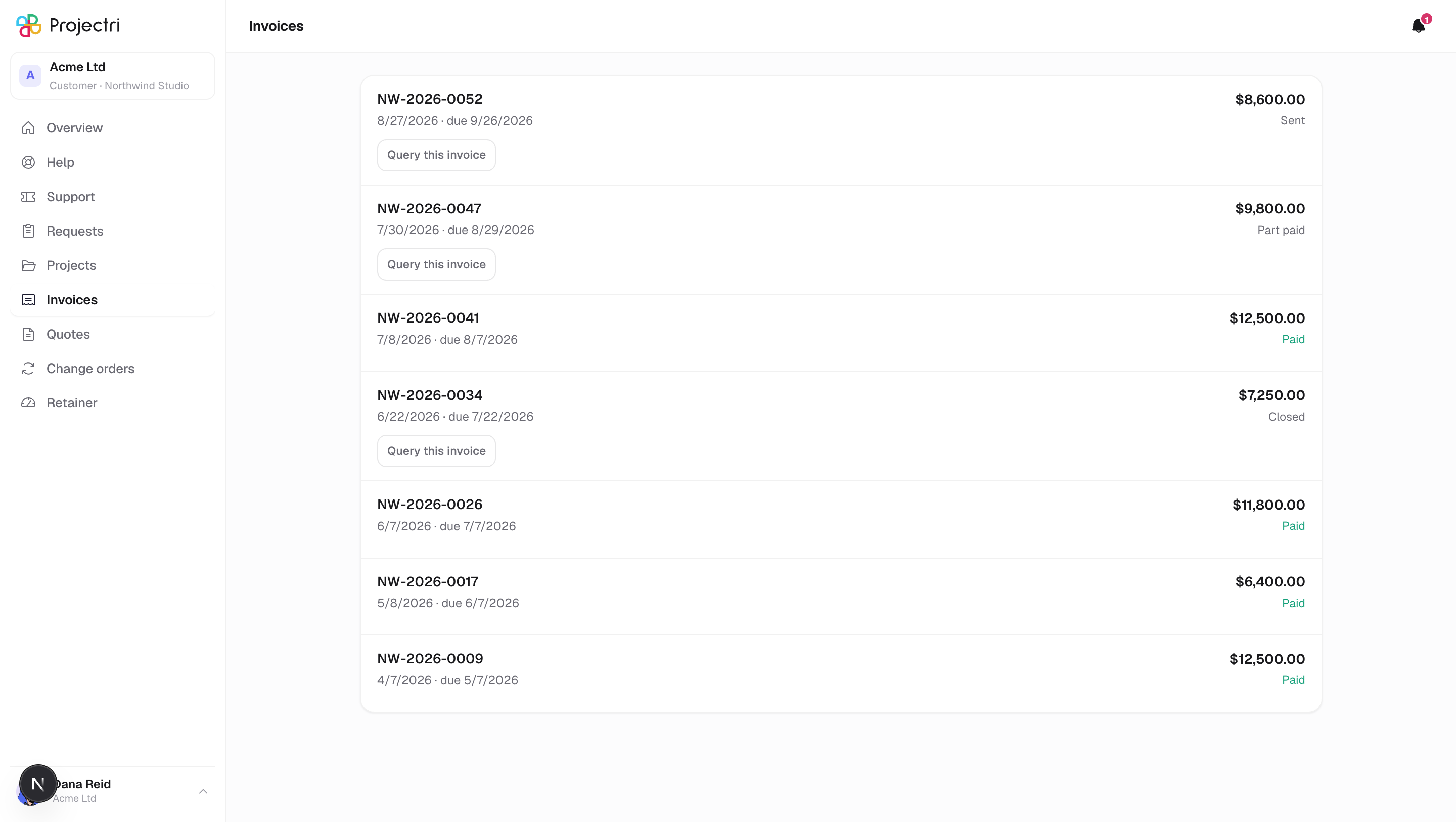
The invoices your supplier has issued to you. Each row leads with the number and its dates, and the figure on the right is what is still outstanding, not the original total. Under it, when they exist: the credit notes applied, the payments received, and the actions available.
How to get there
Invoices in the sidebar. The entry only exists for primary and billing contacts. A technical or view-only contact has no invoices screen at all — and is not notified about invoices either, because the notification carries the amount.
How to use it
Read a row
- The big figure is what is outstanding. The status beneath it says paid, part paid, or where it stands.
- When credit notes have been applied, a block below shows Invoiced — the original figure from the document you were sent — and then each credit note with its number, date and amount subtracted from it.
- When payments have been received, each is listed with the method, the date and the amount. A refund is shown as a refund.
Pay by card
- Press Pay followed by the outstanding amount. It only appears when your supplier can take a card, the invoice is payable, and something is still owed.
- You are taken to a payment page in the same tab.
- The invoice is not marked paid by the redirect — it is marked paid when the payment is confirmed. Closing the tab after paying does not undo the payment; the paid state appears on the next load.
- The amount is fixed to what is outstanding. It is not something the page can be asked to change.
Query an invoice
- Press Query this on any invoice that is not paid.
- Type what the query is. It is required.
- Press Send query. The dialog says what happens next before you send it.
- Once raised, the row shows Query raised and offers Withdraw query.
What it affects
- A query pauses the reminders. Payment chasing stops while a query is open, and your account owner is told about it rather than the invoice quietly ageing.
- A query does not change what is owed. It is not a credit note. Nothing about the amount moves until somebody at your supplier decides it should.
- A disputed invoice keeps its Pay button. If you raised a query and then decided to pay anyway, you can.
On mobile
The Invoices tab in the phone app shows the same rows, the same credit notes and payments, the same Pay button, and the same query and withdraw actions. The tab is absent if your role does not include invoices.
Limits and gotchas
- Drafts and voided invoices are never shown. A draft is your supplier still thinking.
- Line items are not published; the document you were sent is the itemised version.
- Each invoice carries its own currency, and figures are never converted or totalled across currencies.
- The list holds up to 200 invoices, newest first by issue date.
- Card payment depends on your supplier having a live payment account. Where they have not, there is simply no button.
Related
- Retainer — your balance for the current period.
- Change orders — changes to the contract value.
- Quotes — what was priced in the first place.