Client portal
Change orders
Changes to work already agreed — what the contract value and end date go from and to, what is being added or removed, and your approval.
What it is
The change orders your supplier has sent you, and your answer to each. A change order is a variation to work already agreed: it moves the contract's value, or its end date, or both.
How to get there
Change orders in the sidebar. Like invoices and quotes, it exists only for primary and billing contacts, because agreeing to one commits your company's money exactly as an invoice does.
How to use it
Read one
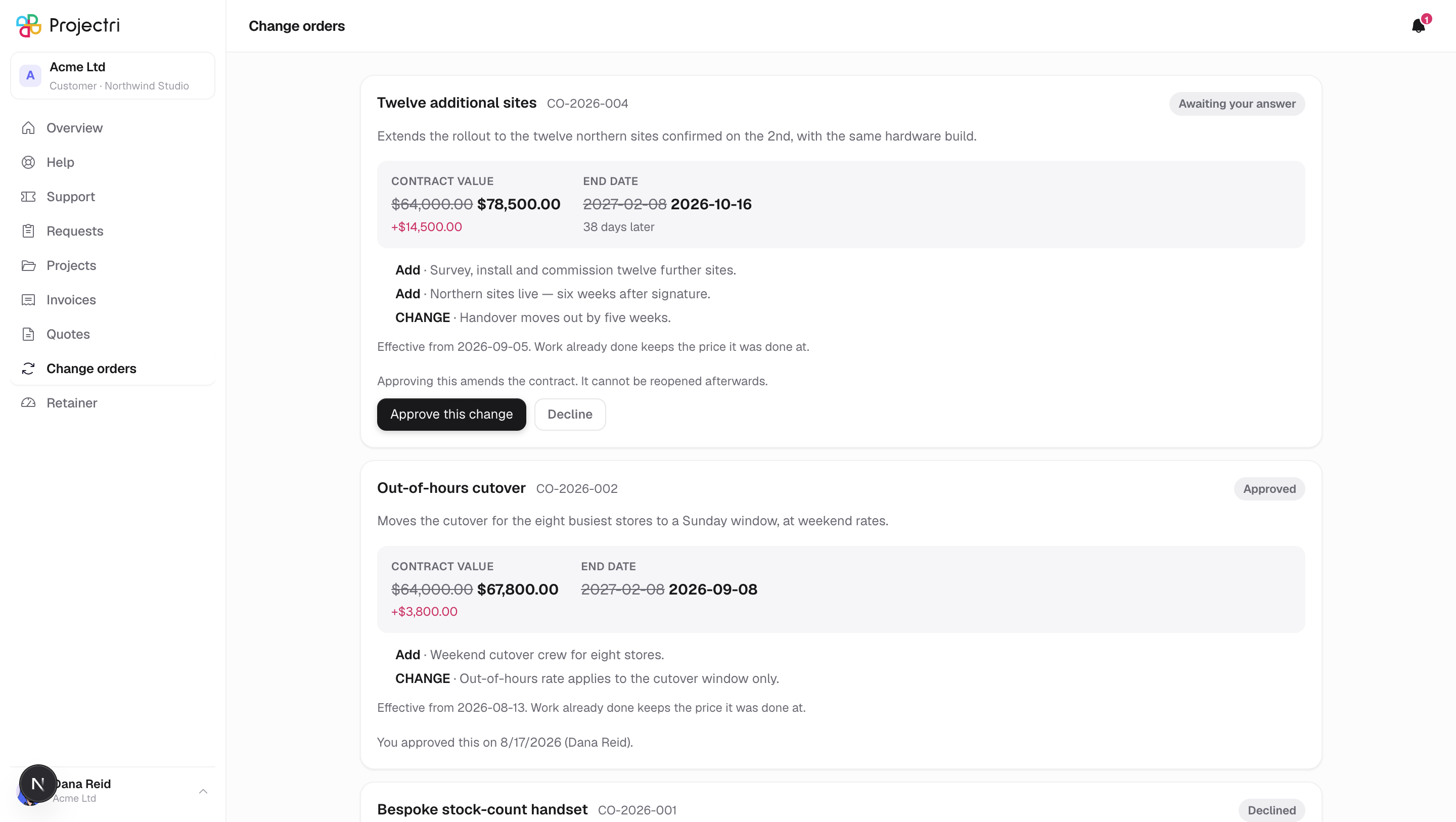
- The card names the change order and its number, with its state as a pill.
- The block underneath leads with before and after — the contract value crossed out and replaced, with the difference beneath it, and the same for the end date when it moves.
- The list below is what actually changes: what is being added, removed or modified. That is the reason the figure is what it is.
- Effective from appears when the change order carries a date.
Approve it
- The consequence is stated above the buttons.
- Press Approve.
- Your name is not asked for — it is taken from the account you are signed into. The form is a confirmation, not a signature block.
Decline it
- Press Decline.
- Type a reason.
- Press the confirm button.
Read a decided one
- A change order you have already answered keeps its place and states the answer where the buttons were — who decided it and when — rather than losing its actions silently.
What it affects
- Approving changes the contract, which is why the value and dates are shown as a move rather than as a delta.
- The record names your account. A change order cannot be signed as somebody else from the portal.
- A change order arrives here and by email, and they are the same document. Answering it in one place answers it everywhere.
On mobile
The phone app has a change-orders screen, but nothing in the app's navigation points at it — in practice you read and answer change orders in a browser.
Limits and gotchas
- Drafts and change orders still under internal review are never shown. Only ones that have actually been sent to you, plus those you have already answered.
- Money is in the change order's own currency.
- The list holds up to 100, newest sent first.